
Working from home often begins with a practical compromise: a laptop at the dining table, a spare chair beside the window or a desk squeezed into the bedroom. Those arrangements may work occasionally, but repeated use reveals small frustrations. The chair may not reach the desk comfortably, the monitor might be too low, or a lamp may leave a distracting reflection across the screen. Creating a better workspace does not require a dedicated room or expensive equipment. It does require looking at how seating, desk height, light, storage and movement interact. The most useful changes are often modest ones that remove friction from the way you work each day.
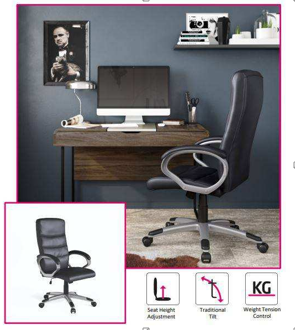
PRODUCT IMAGE | A high-back office chair with arms in a compact desk setup.
Test the Whole Sitting Position, Not Just the Chair
A comfortable setup begins with the relationship between chair and desk. Sit with your feet supported by the floor or a stable footrest and notice whether your shoulders can remain relaxed when using the keyboard. The desk should allow your forearms to work without being pushed upwards by the tabletop. If your chair is too low, raising it may improve the arm position, but you may then need foot support. One adjustment can affect another, which is why testing the complete workstation is more helpful than assessing a chair in isolation.
Check seat depth as well as height. You should be able to sit against the backrest without the front edge pressing uncomfortably behind your knees. A backrest that supports the lower back and allows a natural range of positions is usually more useful than a rigid chair that encourages you to sit perfectly still. Comfort is individual, so use these observations as a fitting guide rather than a promise that one design will suit everyone.
See also: How a Hampshire Buying Agent Helps Avoid Costly Property Mistakes
Decide Which Chair Features You Will Use
Adjustability matters most when it helps the chair fit the person and the task. Seat-height control is particularly useful, while adjustable back tilt and lumbar support can make longer sessions easier to manage. An office chair with arms is worth considering if the armrests can support the forearms without lifting the shoulders or preventing the chair from reaching the desk. Fixed arms may be fine for occasional use, but their height and width need careful checking.
Before ordering, compare the chair’s minimum and maximum seat heights with your desk. Check overall width if the workspace occupies a small alcove, and remember that the chair may need room to swivel or roll backwards. Castors should suit the flooring, while protective mats can be useful on vulnerable surfaces. Read the stated dimensions rather than judging scale from a product photograph taken in a generous office.
PRODUCT IMAGE | Upholstered armrests and a swivel base offer a softer furniture style.
Put Screens and Input Devices in Sensible Places
Laptop screens often sit lower than is comfortable for extended work. A separate keyboard and mouse can make it easier to raise the screen on a stable stand while keeping the hands at a practical working height. Position the main display roughly in front of you, at a distance where text is clear without leaning forward. The top portion of the screen should be around eye level for many users, although the most comfortable position varies with screen size, vision and personal preference.
Keep the items used most often close enough that you do not repeatedly reach across the desk. A keyboard, mouse, notebook and drink should each have a clear place. If the desk is shallow, a monitor arm may reclaim some surface area, but verify the desk’s compatibility and weight capacity first. Loose cables need not be invisible; they simply need to be routed so they do not snag the chair, feet or drawers.
Use Light to Support the Task
Daylight can make a small workspace more pleasant, but a screen directly opposite a bright window may produce glare. Positioning the desk side-on to the window often gives a better balance, subject to the layout. Blinds or curtains provide control as the light changes during the day. A task lamp helps with paperwork and reading, particularly during darker UK afternoons, while an overhead light can prevent the surrounding room from feeling excessively dim.
Choose a lamp that can be adjusted without shining directly into your eyes or reflecting strongly off the screen. Warm decorative lighting has its place, but it should not replace enough useful light to read comfortably. Consider the background during video calls too: a tidy shelf and softer light in front of the face are usually more helpful than an elaborate backdrop that distracts from the conversation.
Design the Day Around Position Changes
Even a carefully fitted chair is only part of the answer. Build in opportunities to stand, walk, stretch gently or change tasks during the working day. A water refill, short telephone call away from the desk or a few minutes by a window can interrupt a long period in one posture. There is no need to turn every break into a formal exercise routine; the practical goal is simply not to remain fixed in the same position indefinitely.
Keep the floor around the chair clear so standing up is easy. Position a filing cabinet, printer or bookshelf where it can be reached safely without twisting over clutter. Small rituals also help: closing the laptop, returning notes to their place and switching off the task lamp can make a shared room feel like a home again when work has finished.
Build Around Your Actual Working Habits
A comfortable home office comes from a series of compatible choices, not from one supposedly perfect chair. Fit the seating to the desk, position equipment where it is easy to use and create simple reasons to move throughout the day. Once the practical details work, the room can be styled to suit the rest of your home without compromising its main purpose.